
Getting records in
Every place you've been treated keeps its own copy of your records — a clinic portal, a hospital system, a PDF in your inbox, the photo of a lab report on your phone. They were never built to talk to each other, so Clarity brings them together.
Clarity accepts the records you already have, in the shapes they already take. There are three paths in, depending on what you have:
- 01
Drop in files you've downloaded.
Lab PDFs, visit summaries, imaging reports, immunization records, insurance scans, after-visit notes — anything you can save from a patient portal. Clarity reads PDF, JPG, PNG, WebP, HEIC, GIF, TXT, and XML (including CCDA exports), up to 50 MB per file. Have a folder? Drop in a ZIP and Clarity will unpack it. - 02
Snap a photo of paper.
Open the Scanview to capture a printed lab report, a handwritten medication list, or a discharge instruction sheet with your phone's camera. Clarity reads the paper, extracts what's relevant, and adds it to your record. - 03
Connect to a patient portal.
In progress.Direct portal connections will let you pull your chart straight from your provider's system instead of downloading-then-uploading. The first integrations are in build.
How Clarity understands them
Searching a document isn't the same as understanding it. Most tools can find a word in a PDF; Clarity reads the whole record and works out what it actually means — the conditions, the medications, the numbers, and how they fit together.
Reading is the hard part. Once a record is uploaded, Clarity does four things in sequence — none of them dramatic on their own, but together they turn a pile of paper into a chart you can actually use.
- 01
Recognize the words.
Scanned PDFs, photos of paper, and image attachments are read with OCR. Native PDFs skip this step. Either way, every page becomes searchable text. And when a scan is an image with no words to read — an X-ray, an MRI — Clarity describes what it shows in plain language, so even a picture becomes something you can read. - 02
Extract what matters.
Dates, values, units, medications, diagnoses, providers, procedures — Clarity pulls the structured pieces out of the unstructured text so they can be plotted on a timeline and compared across visits. - 03
Summarize in plain English.
Each document gets a short, plain-language summary that explains what it is, what's on it, and which numbers are worth knowing. Long documents get longer summaries; lab reports get the kind of summary a careful friend who happens to read medical literature would write you. - 04
Cite everything.
Every claim Clarity surfaces ties back to a specific page in a specific document. Citation markers in chat and on the timeline are links — click and you see the exact line in the original record. Clarity never answers from the open internet.
Privacy & security
If we're going to be the place your medical record lives, the first question we owed an answer to is — who else can see it? The honest answer is nobody, by default.
Privacy is treated as a feature here, not a footer. The posture is plain and written into the system itself, not just promised in a policy document:
- Encrypted at rest and in transit.
- Row-level security — your records are unreadable to other accounts.
- No foundation-model training on patient records. Ever.
- Export or delete everything, anytime, no questions.
- 01
Encrypted in transit and at rest.
Every upload travels over TLS and is encrypted before it lands on disk. The infrastructure is HIPAA-grade and audited. - 02
Row-level security at the database.
Your records are isolated at the database itself. Other accounts — including ours, for ordinary product work — can't read them. The constraint is structural, not a permission someone could forget to check. - 03
Never used to train foundation models.
Patient records are not used to train, fine-tune, or improve any foundation model. The AI that reads your chart does not learn from your chart. - 04
Sharing is opt-in, scoped, and revocable.
Nothing is shared until you create a packet or a share link. Each link is scoped, expirable, and revocable from your settings. - 05
Export or delete, anytime.
Download your records and your generated artifacts whenever you like. Delete your account whenever you like. We don't hold your health hostage.
Full detail lives in the Privacy Center and the HIPAA notice.
Your health at a glance
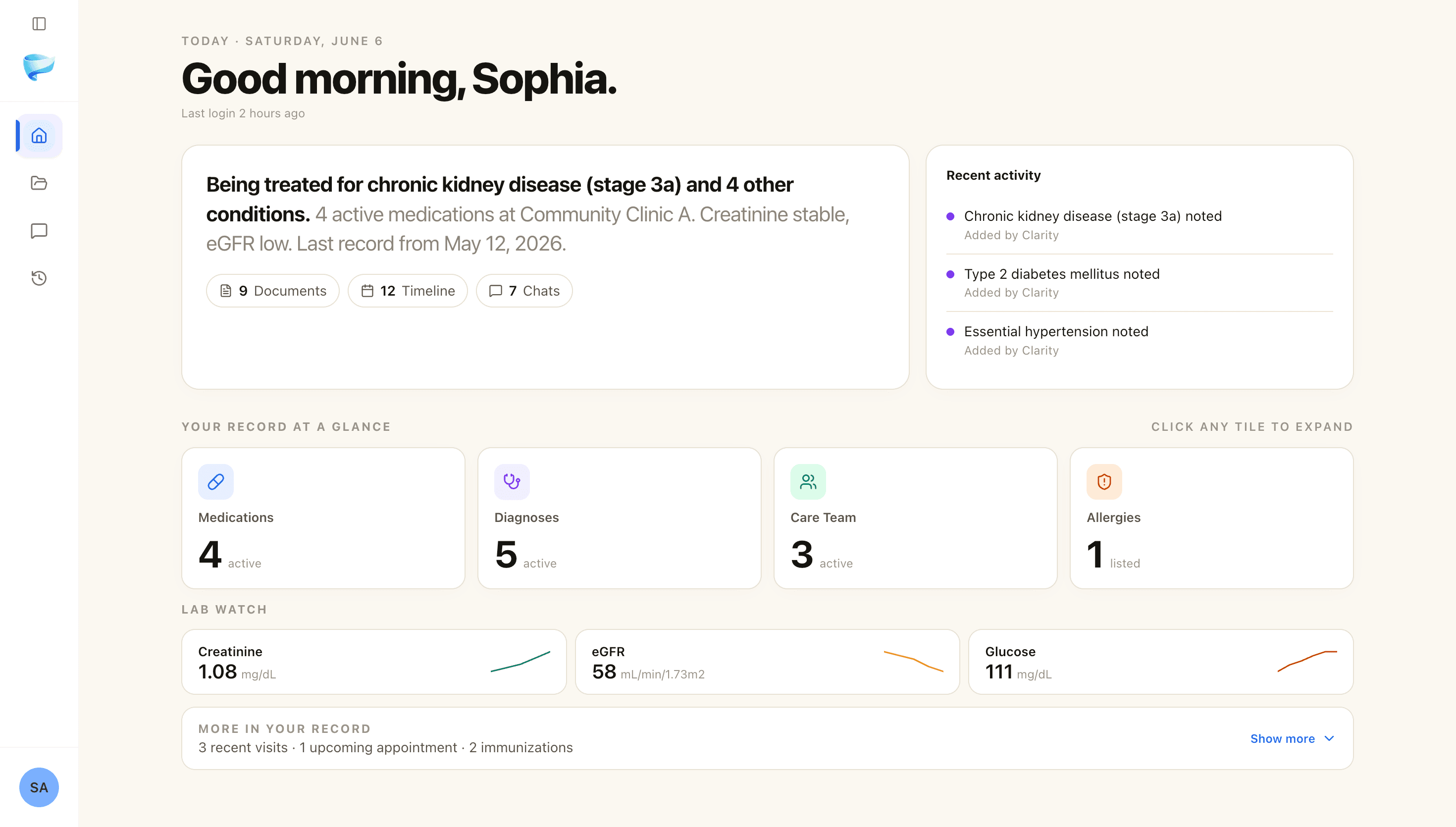
Once everything is read, the most useful thing Clarity can do is also the simplest — show you, on one screen, what is actually going on with your health.
Your home is a single, plain-language snapshot of where you stand — written for you, not for a chart. Underneath it sit the things that actually matter, each one a tap away.
- 01
A summary in plain words.
An AI-written read on your health as it stands today — the kind of sentence you'd actually say out loud, not a wall of codes. - 02
Everything, one tap away.
Medications, diagnoses, allergies, your care team, appointments, past visits, and immunizations — each its own tile, each opening the full picture, active and past. - 03
Lab Watch — your numbers over time.
Pin any lab Clarity finds in your records — A1c, cholesterol, PSA, kidney markers, whatever you're tracking — and it keeps a living trend on your home: the latest value, whether it's in range, and which way it's heading. Tap through for the full history and the source behind every number. It updates itself as new records come in.
Your timeline
Health is rarely a single number on a single day. It is a line that bends — and you usually want to see the line, not just the dot.
Once records are read, Clarity arranges everything that happened in time on a single chronological view. Visits, lab panels, imaging studies, prescriptions, procedures, immunizations — all placed where they actually happened, not grouped by which portal sent them.
- 01
One continuous chronology.
The timeline merges records across providers and facilities into a single scroll. The drop in your hemoglobin from one lab shows up next to the prescription change from a different clinic two weeks later — because that's how it actually happened. - 02
Trends, not just events.
Key labs get charted over time so you can see when something spiked, when it stabilized, and how a treatment correlated with the change. - 03
Grouped when it helps.
A flurry of records from the same visit cluster into one card so the timeline reads as visits, not as a flood of documents. Tap any group to expand the underlying records.
Plain-language chat
There is a particular kind of question that sits between 'too small to call the doctor' and 'too important to ignore.' Plain-language chat is for that gap.
Clarity's chat is not a generic medical assistant. It is a reader for your records, and it works in two scopes:
- 01
Ask about a single document.
Open a lab report or visit summary and ask “what does this mean?” or “which numbers are out of range?” Clarity answers from that document only, with citations to the lines it used. - 02
Ask about your full record.
From the dashboard, ask broader questions — “when was my last cholesterol panel?”, “what medications am I on?”, “summarize my cardiologist visits this year.” Answers are pulled from across your timeline with citations to the specific records that supplied them.
Underneath, a few things make it trustworthy enough for a medical question:
- 01
Every answer, cited.
Each answer points back to the exact document it came from — tap a citation to open the source and read the line in context. - 02
Trends, drawn for you.
Ask how a number has moved and Clarity draws the chart inline, right inside the conversation. - 03
It shows its work.
Every answer carries a “what I checked” note — which of your records and vitals it used, and, when it helps, the trusted medical sources it looked up. Your records are never sent out to do that search. - 04
Ask however is easiest.
Type it, dictate it with the mic, or attach a photo of the thing you're looking at — all right in the conversation.
Capturing visits live
The most important things in a doctor's visit are often the ones said quickly, near the end, while you are already putting your coat on.
Listen is a separate flow inside Clarity that records a visit in your pocket, transcribes it, and pulls out the parts most people want to walk away with: medication changes and dosages, follow-up tasks and dates, referrals, and the things to watch for between now and the next appointment.
Listening
04:21
After the visit — what we listen for
- Medication changes and dosage updates
- Follow-up tasks, referrals, and dates
- Things to watch for, in plain language
We are shipping this carefully. Listen is currently in beta, available to early users while we sand down the rough edges around audio quality, multi-speaker accuracy, and consent UX. The shape of the feature is set; the polish is still landing.
A few more things you can do
Scan
BetaPoint your phone at a medication, a label, or a lab printout and Clarity reads it against your records.
Apple Health
BetaBring in steps, heart rate, and other vitals through an Apple Shortcut you set up. Native syncing is coming with the app.
Memory
Clarity remembers the context you share so you don't repeat yourself — review or erase it anytime.
Caregiver profiles
For a lot of people, health isn't only their own to manage — you're often the one keeping track for a parent, a partner, or a child. The same care you bring to your own records, you bring to theirs.
Clarity separates whose records these are from who happens to be logged in. Under one account, each person you care for gets their own private health record — their own documents, timeline, labs, and chat — kept entirely apart from yours.
- 01
A profile for each person.
Add a child, a parent, a partner, and switch between them in a tap. Nothing crosses over — Mom's labs never surface in your chat, and yours never surface in hers. - 02
Hand over the keys, safely.
Invite a sibling or partner by email to help manage a profile. They sign in to their own account; you grant and revoke access in a tap, enforced in the database itself — no shared passwords, no records emailed around. - 03
Always know who did what.
Every profile keeps a quiet activity log — “uploaded 3 documents · 2h ago” — so two people caring for the same person never lose the thread. - 04
Filed under the wrong name?
Move a document, and everything Clarity built from it, to the right person in a single step.
Profiles
- YYouSelfViewing
- MMomParent
- LLeoChild
Shared access
Mom's records · shared with Sam
Sam uploaded 3 documents · 2h ago
Caring for a parent, partner, or child? Read the full guide for caregivers →
What's coming next
Clarity is a young product with a long roadmap. A short, honest look at what we're building next.
- 01
A Clarity app for your phone.
A native iPhone app is in active testing — several iterations are already in the hands of TestFlight users. The real upgrade is native Apple Health (HealthKit)sync — no Shortcut workaround — plus the speed and feel of a true native app. What's left is the unglamorous part: bringing it to parity with everything we've shipped on the web, and polishing the flows until they feel right. We'll launch it when it's genuinely ready, not before. - 02
Direct portal connections.
Pull your records straight from your provider's chart system without the download-then-upload round-trip. The first patient-portal integrations are in build. - 03
Deeper specialist hand-offs.
Packets are getting smarter — more focus on what a specific specialist actually wants to see ahead of a visit, fewer redundant pages. - 04
Listen, out of beta.
Polishing the consent UX, multi-speaker accuracy, and retention controls until Listen is something we'd hand to anyone, not just early users. - 05
More languages.
Plain-language explanations should be plain in more than English. This one is on the list.
We update this list as things ship. If there's something specific you'd want Clarity to do next, the contact form reaches a real person.
Common questions
A short list of the questions people ask most often before they sign up.
Is this a replacement for my doctor?
No, and it's not trying to be. Clarity is a translator — it helps you read and understand what's already in your chart so you can ask better questions and remember what was said. Diagnosis and treatment decisions stay with your licensed care team.
What if I'm uneasy about AI reading my medical records?
That's a reasonable starting position. Two specific things to know: (1) Clarity does not train foundation models on your records — your data is not used to make a generic AI smarter. (2) Every answer Clarity gives you is grounded in your actual documents, not in the open internet, and it can show you the exact page it pulled from.
Can I manage records for my parent, partner, or child?
Yes — it's one of the core use cases. Under a single account you can keep a separate, private profile for each person you care for, switch between them in a tap, and invite a sibling or partner by email to help manage a profile. Caregiver profiles are part of Plus, and access today is all-or-nothing: anyone you invite can fully manage that profile (there isn't a view-only mode yet).
Can Clarity track a lab value over time?
Yes. Pin a lab — A1c, cholesterol, PSA, and the like — to your dashboard with Lab Watch, and Clarity keeps a running trend: the latest value, whether it's in range, and a small chart of where it's heading. The numbers are read from your own documents, and each one is cited back to the exact record it came from.
What if I have ten years of scattered records?
That's the situation Clarity was built for. Upload what you have, in any format, and the timeline grows as the records are read. You don't have to upload everything at once.
What's the catch with the free tier?
There isn't one in the dishonest sense. The free tier includes five document uploads — enough to see whether Clarity actually helps for your situation before you commit. Paid plans unlock larger volumes, deeper features, and longer histories.
How is Clarity different from a patient portal?
Portals are storage. Clarity is a reader. A portal hands you a PDF; Clarity reads the PDF, places it on a timeline next to everything else you've shared, summarizes it in plain language, and lets you ask follow-up questions grounded in the document itself.
A simpler way to do all of this
Clarity Health was built specifically for this work.
Upload a lab report, a discharge summary, or years of scattered records. Clarity reads every page, places it on a chronological timeline, summarizes it in plain English, and answers your follow-up questions in chat — every answer cited back to your actual records, never to the open internet.
HIPAA-grade infrastructure. No data sold. No foundation-model training on your records. A shared mode designed for the family conversation, not just the patient portal.
The free tier includes five document uploads. A free account is required — every record is encrypted and tied to its owner, which is how the system stays HIPAA-compliant. Signup takes seconds and asks only for an email.
5 free uploads · clarity.quasar.nexus
Helpful guides before you start
A few short reads that pair well with Clarity.
Before the visit
Questions to ask before an appointment
A short practical list of the questions most patients wish they'd asked.
Read the guideFirst time
Organize your medical records — a checklist
A starting point for getting years of scattered records into one place.
Read the guideCaregivers
A caregiver's medical-record workflow
How to set up records once so every appointment after is faster.
Read the guideBrowse all
All Clarity guides
Every practical guide — visits, records, specialists, caregivers, labs.
Read the guide