
The weight you’re already carrying
For a lot of us, the hardest part of caring for someone isn’t the love — it’s the logistics. The bag of pill bottles no one has reconciled. The four patient portals with four passwords. The specialist who asks what the last doctor changed, and the long pause while you try to remember.
You are not an edge case. Caring for a parent, a partner, or a child is one of the most common — and least supported — jobs in American healthcare.
63M
Americans care for an adult or child family member — about 1 in 4 adults
AARP / NAC · 2025(opens the source in a new tab)1 in 3
caregivers help a parent and a child at the same time — the “sandwich generation”
AARP / NAC · 2025(opens the source in a new tab)54–67%
of hospital admissions carry at least one medication discrepancy, a review found
AHRQ PSNet(opens the source in a new tab)1 in 5
Medicare patients is readmitted within 30 days — many of them preventable
CMS HRRP(opens the source in a new tab)
You can’t make the work disappear. You can stop carrying all of it in your head. The mechanical part — gathering the records, keeping the medication list current, remembering what changed since the last visit — is exactly the part Clarity takes off your plate.
A record that’s truly theirs
The first thing Clarity does is the thing a shared login never can — it gives the person you care for a record of their own, kept entirely apart from yours.
Clarity separates whose records these are from who happens to be signed in. Under one account, each person you care for gets their own private health record — their own documents, timeline, labs, and chat.
- 01
A profile for each person.
Add a parent, a partner, or a child — with their name, relationship, and date of birth — and switch between them in a tap. When you’re in their record, a quiet banner reminds you whose you’re viewing, so nothing gets filed under the wrong name. - 02
Nothing crosses over.
Mom’s labs never surface in your chat, and yours never surface in hers. Each person’s documents, summaries, and trends stay their own — a boundary between the people you care for, not a setting you have to manage. - 03
Filed under the wrong name? Fix it in a couple of taps.
Move a document to the right person and the work Clarity built from it — the labs and medications it held, the timeline entries drawn from it — moves with it.
Profiles
- YYouSelf
- MMomParentViewing
- LLeoChild
Kept separate
Mom’s labs never surface in your chat — and yours never surface in hers. Each person’s record is its own private world.
Get their whole story in one place
Their care is scattered across portals, clinics, and a folder of printouts — formats that were never built to talk to each other. Clarity takes it in the shapes it already comes in.
Upload what you already have for the person you care for, and Clarity reads every page — pulling out the dates, values, medications, and diagnoses, summarizing each record in plain English, and citing everything back to the source.
- 01
Drop in their files.
Lab PDFs, visit summaries, imaging reports, discharge papers, insurance scans — anything you can download from a portal. Clarity reads PDF, JPG, PNG, WebP, HEIC, GIF, TXT, and XML (including CCDA exports), up to 50 MB per file. Have a folder of them? Drop in a ZIP and Clarity unpacks it. - 02
Snap a photo of the paper.
Open the Scan view to capture a printed lab report, a handwritten medication list, or the discharge sheet from the last hospital stay with your phone’s camera. - 03
Connect a patient portal.
In progress. Direct portal connections will let you pull their chart straight from the provider’s system instead of downloading and re-uploading. The first integrations are in build.
Their health at a glance
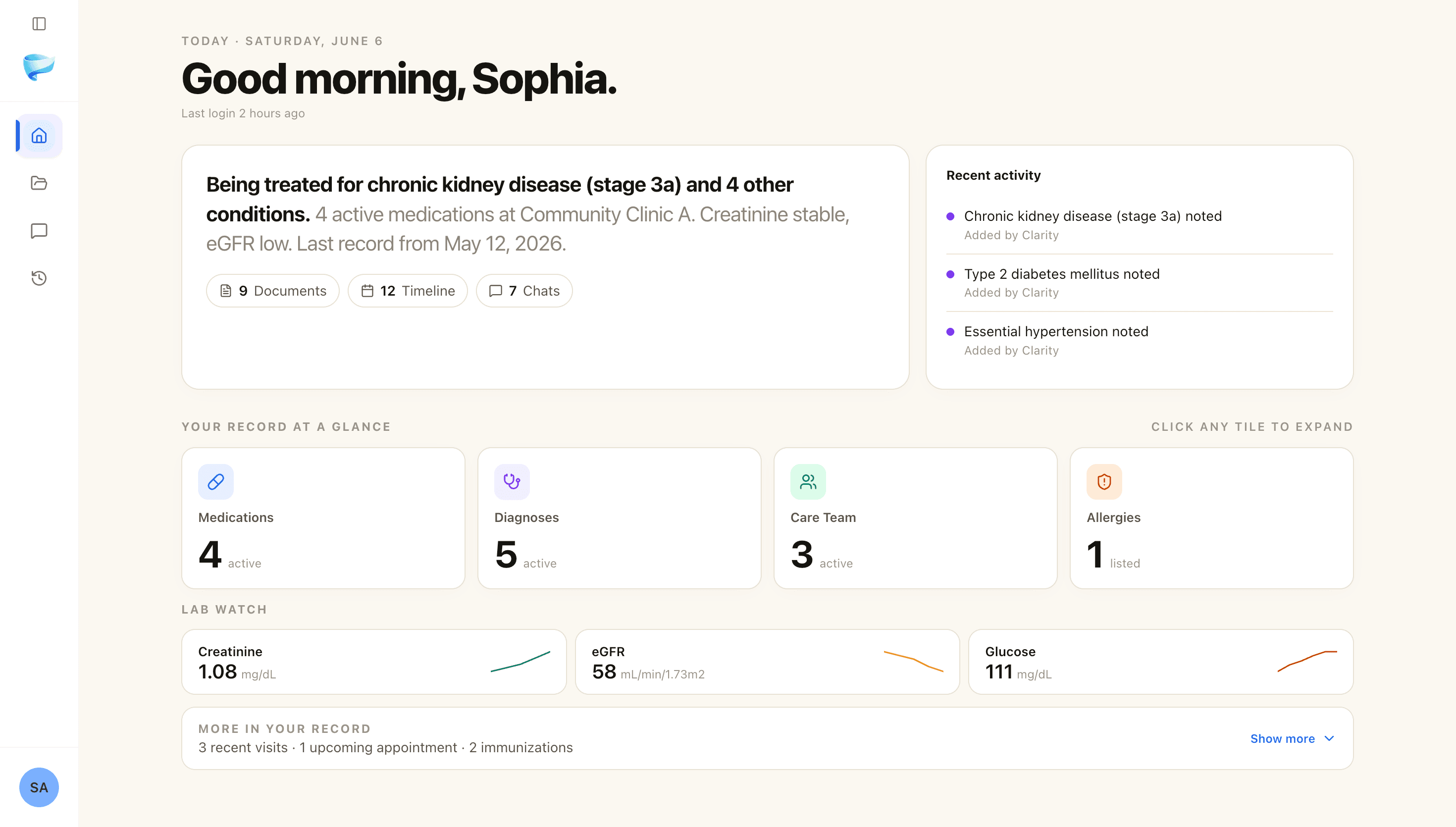
Once their records are read, the most useful thing Clarity can do is also the simplest — show you, on one screen, what’s actually going on with the person you’re worried about.
Their home is a plain-language snapshot of where they stand — written for a family member who loves them, not for a chart. Underneath it sit the things that actually matter, each a tap away.
- 01
A summary in plain words.
An AI-written read on their health as it stands today — the kind of sentence you’d actually say to a sibling on the phone, not a wall of codes. - 02
Medications, conditions, and care team — in one place.
Each its own tile: what they take, what they’ve been diagnosed with, what they’re allergic to, and which doctors are involved. The medication snapshot caregivers are forever rebuilding, kept current as new records come in. - 03
Lab Watch — their numbers over time.
Pin any lab Clarity finds in their records — A1c, kidney markers, an INR you’re keeping an eye on — and it keeps a living trend on their home: the latest value, whether it’s in range, and which way it’s heading. Tap through for the full history and the source behind every number.
A timeline that survives every handoff
Caregiving is a relay race no one trained for — a hospital, then a rehab, then three specialists, each starting from a little less than the last. The timeline is how the baton stops getting dropped.
Clarity arranges everything that’s happened to the person you care for into one chronological view — across every provider and facility — so when the cardiologist asks what changed since the winter admission, you have the line, not a foggy memory.
- 01
One continuous chronology.
Visits, labs, imaging, prescriptions, and procedures from every clinic, merged into a single scroll — placed where they actually happened, not grouped by which portal sent them. - 02
Trends, not just today’s number.
Key labs are charted over time, so “she’s seemed more tired” becomes “her hemoglobin has dropped across three draws since January.” - 03
Grouped into visits.
A flurry of records from one hospital stay collapses into a single card you can expand, so the timeline reads like a story, not a flood of files.
Ask what you don’t have time to look up
It’s 9pm on a Sunday and a question surfaces that’s too small for the on-call line and too big to ignore. That’s the gap plain-language chat is for.
Clarity’s chat is a reader for their records — not a generic medical assistant. Ask about the person you care for, and every answer is grounded in their actual documents and cited to the page it came from:
- 01
Catch up in one question.
“What changed at Mom’s last cardiology visit?” or “Summarize her hospital stay in February.” Clarity reads across her timeline and answers in plain language. - 02
Make sense of the medication list.
“What is each of her medications for?” Clarity explains them from her own records — and it shows its work, including any trusted sources it checked. Her records are never sent out to do that. - 03
Ask however is easiest.
Type it, dictate it with the mic, or attach a photo of the bottle or the after-visit sheet you’re holding.
Walk in briefed, even when you can’t be there
Some of the hardest appointments are the ones you can’t be in the room for — where someone else has to carry the story. Clarity makes the story portable.
When the person you care for needs to bring their history somewhere, Clarity assembles a clean packet on demand — and gives you control over who sees it and for how long.
- 01
A doctor-ready packet.
A clean PDF assembled from their records — a cardiology referral, a year-end summary, a focused bundle. The cover is a plain-language summary; the body is the source records that back it up. Hand it to the new specialist, print it for an aide, email it to the sibling taking them this week. - 02
The right questions, before the visit.
Ask Clarity to draft the questions worth asking from their record, then walk in — or send someone in — with them written down. There’s a whole playbook for this in Appointment prep. - 03
Capture the visit you do attend.
Listen (in beta) records the appointment in your pocket, transcribes it, and pulls out the medication changes, follow-ups, and things to watch for — so you’re not scribbling while the doctor is still talking.
Packet
Cardiology referral · 12 pp.
A clean PDF of the relevant labs, imaging, and visit summaries — generated on demand.
Share link
For Dr. Tran · Expires in 7 days
Trusted with the people you love
If we’re going to hold the record of someone you love, the first question we owe an answer to is — who else can see it? The honest answer is no one you haven’t chosen.
For a caregiver handling another person’s most sensitive information, privacy can’t be a footer. It’s written into the system itself:
- Encrypted at rest and in transit.
- Row-level security — your records are unreadable to other accounts.
- No foundation-model training on patient records. Ever.
- Export or delete everything, anytime, no questions.
Their records are encrypted in transit and at rest, isolated so that other accounts — including ours, for ordinary product work — can’t read them, and never used to train or improve any AI model. You can export everything, or delete it, whenever you like.
Full detail lives in the Privacy Center and the HIPAA notice.
Common questions
A few questions families ask before they start.
Can I manage my parent’s records and my own in one account?
Yes — it’s the core use case. Each person you care for gets a separate, private profile, and you switch between them in a tap. Nothing crosses over between profiles. Caregiver profiles are part of Plus.
What if my sibling and I both help out?
Invite them by email and they can help manage the profile from their own account — you can revoke that access anytime, and you’ll always see an activity log of what changed. One honest caveat: access today is all-or-nothing. Anyone you invite can fully manage that profile; there isn’t a view-only mode yet.
Does the person I care for need their own account?
No. You manage their profile from your account — they don’t have to sign up or log in anywhere. The only people who need their own login are the family members you invite to help, who sign in as themselves.
Is it safe to put my mom’s records into an AI?
Two things matter here. Privacy: Clarity is HIPAA-grade — her records are encrypted, isolated by row-level security, and never used to train AI models. Accuracy: every answer is grounded in her actual documents and cited to the source, not guessed from the open internet. That’s the difference between Clarity and pasting records into a general chatbot.
What does it cost?
Your own records are free to start — five uploads, no card. Managing records for someone else — caregiver profiles and inviting family — is part of Plus. The pricing page has the details.
What about HIPAA authorization, proxy access, and power of attorney?
Those are the legal side of caregiving, and they matter as much as the software. We wrote a separate, practical guide on getting access, building a medication snapshot, and keeping a shared narrative across teams — it’s the best place to start.
You don’t have to hold it all
Start with one record for the person you care for.
Upload a lab report, a discharge summary, or the medication list you’ve been keeping by hand. Clarity reads every page, builds their timeline, keeps their medications in one place, and answers your questions — every answer cited back to their actual records, never the open internet.
HIPAA-grade infrastructure. No data sold. No foundation-model training on their records. A shared mode built for the family conversation, not just the patient portal.
Your own records are free to start — five uploads, no card. Caregiver profiles are part of Plus. Signup takes seconds and asks only for an email.
5 free uploads · clarity.quasar.nexus
Guides for caregivers
A few short reads that pair with this.
Start here
A caregiver’s medical-record workflow
Federal access rights, the medication snapshot that prevents harm, and the shared narrative that travels across teams.
Read the guideBefore the visit
Questions to ask before an appointment
A short, practical list of the questions most families wish they’d asked.
Read the guideFirst time
Organize medical records — a checklist
A starting point for getting years of scattered records into one place.
Read the guideBrowse all
All Clarity guides
Every practical guide — visits, records, specialists, caregivers, labs.
Read the guide